You're writing your YouTube scripts wrong (and how to fix that)
You write your script from top to bottom in one document, and that document is the problem.
I don't mean your hooks are bad or your pacing is off, and this isn't about whether you use AI or write every word yourself at 6am with monk-like discipline. I mean the container itself. The blank page you're pouring your script into is quietly working against every single video you make.
That's a big claim, so let me earn it, because I spent years earning it the slow way.
A script is not a document
Start with what a script actually is: a chain of decisions. Which promise opens the video. Which of three possible stories carries section two. Whether the reveal lands before the detour or after it. Every section has alternatives you considered along the way, and the script you finally record is one path through all of them.
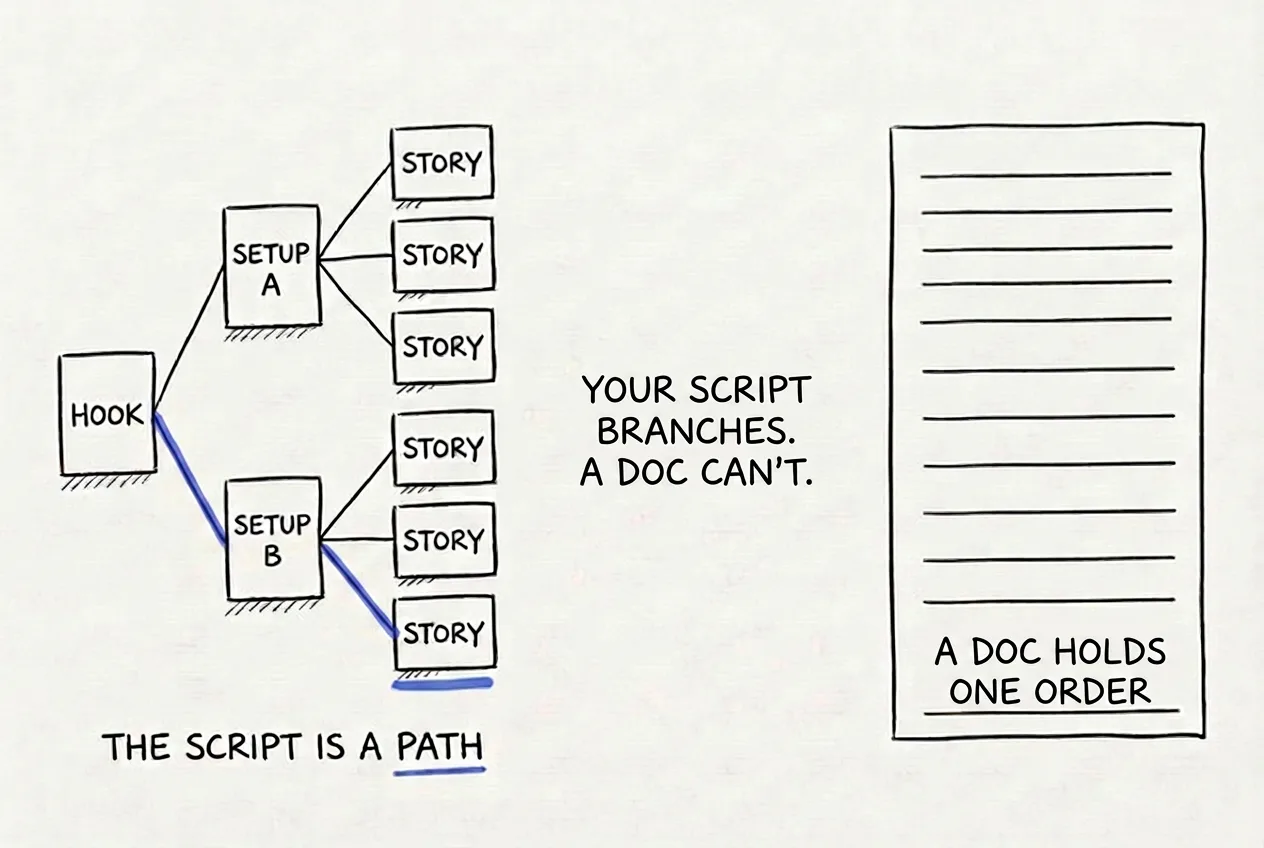
What you're actually writing versus what the page can hold: a branching set of options with one chosen path, versus one fixed top-to-bottom order.
A document can't hold that shape, because a document only reads one way: top to bottom, one thing after another. So when you write a script in a doc, you're forced to squeeze a branching set of decisions into that single top-to-bottom order as you go, and the squeezing produces the exact failures every creator knows by name. You can't start section four until sections one through three feel done, so one stubborn paragraph jams the whole video. Rewriting a section means destroying the old version, so you end up polishing your first idea instead of finding your best one. Your alternate takes live as graveyard text at the bottom of the doc, or in your head, or nowhere at all. And when you come back to the script on Thursday, you have to re-read everything just to remember where the thread was.
None of that is a talent problem, and it isn't a gap in your method. You could know the complete scripting system cold and a doc would still jam on you. It's a container problem. You're pouring a script that branches into a page that can only hold one thing after another.
I didn't see it that clearly at the time, of course. I just knew my docs kept jamming in the same places, so I did what any mildly obsessive creator would do. I built a table.
My first fix: the spreadsheet era
I didn't figure this out cleanly, and I want to show you the messy middle, because I figured it out by building an increasingly deranged table.
Back then, my scripts lived in a Notion table with six columns: chapter, role, script, scene description, scene mockup, and asset links. Every row held one sentence of the video, paired with exactly what should be on screen while I said it. A 7-minute video came out to 111 rows.
You might need to scroll horizontally to see all the columns
| Chapter | Role | Script | Scene Description | Scene Mockup | Scene Asset Links |
|---|---|---|---|---|---|
| Hook | Setup | Spoiler alert... the freelancer I hired for $500 blew my mind. But more on that later. | Face cam, direct address | — | canva.com/design/DAF3x9k2Lm0/edit |
| Tension | What does $0 get you, and what does $500 get you? | Face cam | — | canva.com/design/DAF3x9k2Lm0/edit | |
| Tension | Should you really be paying $500 for a logo? (older take, kept the energy but buried the question) | Face cam | — | drive.google.com/file/d/1a2b3c4d5e/view | |
| Payoff | (Pause for 3 seconds) I built two versions of the same logo. One cost nothing. | Screen recording, side by side | figma.com/file/9kLmZ2/logo-compare | drive.google.com/file/d/9f8e7d6c/view | |
| Design Brief | Setup | These are my best guess of the expectations that my title and thumbnail create | If nothing is listed, show face cam | — | canva.com/design/DAF3xB7q/edit |
| Tension | Read this carefully as it explains the new script format. | Face cam | — | docs.google.com/document/d/1k9j8h7g/edit | |
| $0 Logo | Setup | 90!! (Pause for effect) That's how many free logo makers I tried before this one. | Screen recording | canva.com/design/DAF9kL2m/edit | drive.google.com/file/d/2b3c4d5e/view, d... |
| Tension | the music needs to build up to this | B-roll, logo reveal | — | drive.google.com/file/d/3c4d5e6f/view | |
| Payoff | Free. Generic. Exactly what you'd expect. | Face cam reaction | — | — | |
| Interviews | Setup | So I asked three designers what they actually think about $0 logos. | Interview clip 1 | — | drive.google.com/file/d/4d5e6f7g/view |
| Tension | Same as above | Interview clip 2 | — | drive.google.com/file/d/5e6f7g8h/view | |
| Tension | Same as above | Interview clip 3 | — | drive.google.com/file/d/6f7g8h9i/view | |
| ...12 more near-identical interview rows... | |||||
A faithful recreation of my actual script table. Note the horizontal scrollbar. There was a warning callout above the real one that literally said "you might need to scroll horizontally to see all the columns."
The column that mattered most was "role." Every sentence in the script was tagged with one of three jobs: setup, which builds curiosity, tension, which is the story you tell before delivering on the setup, or payoff, which delivers on it. Each chapter of the video got exactly one of each. That single column did more for my retention than anything I'd tried before it, because it forced every section of the video to be a tiny story instead of a lump of information, which is a big part of why viewers stop watching. If you want the full structural system behind those three jobs, it's in the 7 parts of a high-retention script.
And to be fair to the table, it was genuinely better than the doc. Sections became independent units. Each one had its own arc. For the first time, I could actually see the video's skeleton.
Then it broke, and it took me embarrassingly long to name the reason.
Where the table broke
Say I didn't like the hook I'd written for section two. My move was to add a new row underneath it and write a second take, and if that still wasn't right, a third row with a third take.
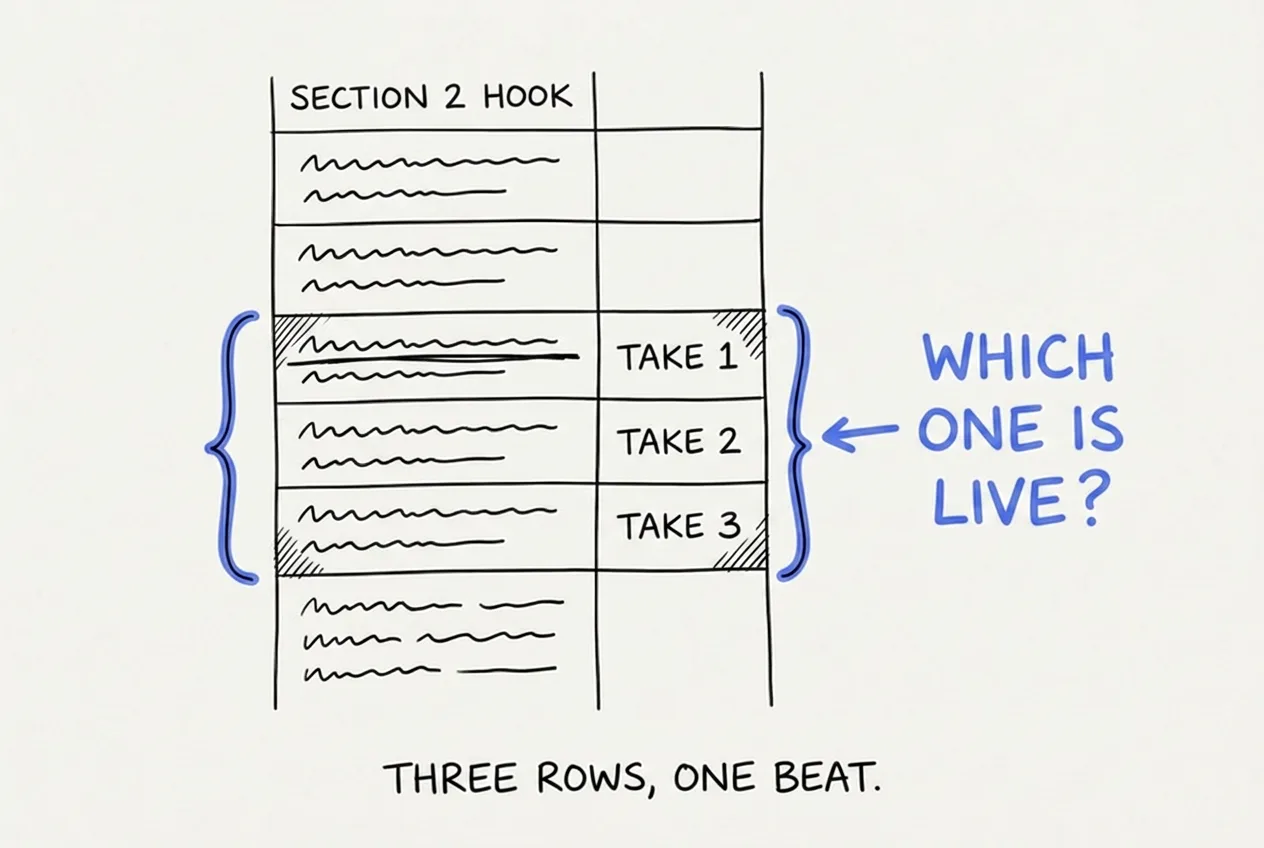
Three rows, one beat. The table has no way to say "these are versions of each other," so every alternative looks like more script.
Now the table has three rows all claiming to be the same beat of the same video. Multiply that across a few sections and the script becomes unreadable, because you can no longer answer basic questions at a glance. Which take is live? Does the payoff in row 40 pay off the setup from take one or take three? My workaround was to cross out rejected takes and leave them sitting there, struck through, in the middle of the table. In my old scripts you can still find crossed-out sentences inside otherwise-final chapters.
So all the pruning got deferred to one painful full read-through at the end. And here's the thing I eventually saw: the feature that made the table powerful, one row per beat, is exactly what made alternatives poisonous to it.
A table can hold your script's structure, or it can hold your alternatives, but it can't hold both. Rows can represent the sequence, or rows can represent competing takes, and the moment they're doing both jobs at once, you're doing bookkeeping instead of writing.
So the doc can't hold your alternatives, and the table can't either. What kind of workspace can?
The fix: takes stack, edges connect
The realization that eventually became ScriptGraph, a tool I built to hold scripts in the shape they actually have, is almost embarrassingly simple once you see it.
Sections belong in columns, laid out left to right in video order. Alternative takes of a section belong stacked inside their column, top to bottom. And the actual script, meaning the path you'll record, is drawn as connections: this hook flows into that setup, which flows into that story. When you change your mind, you're not deleting rows and renumbering anything. You're pointing a connection at a different card.
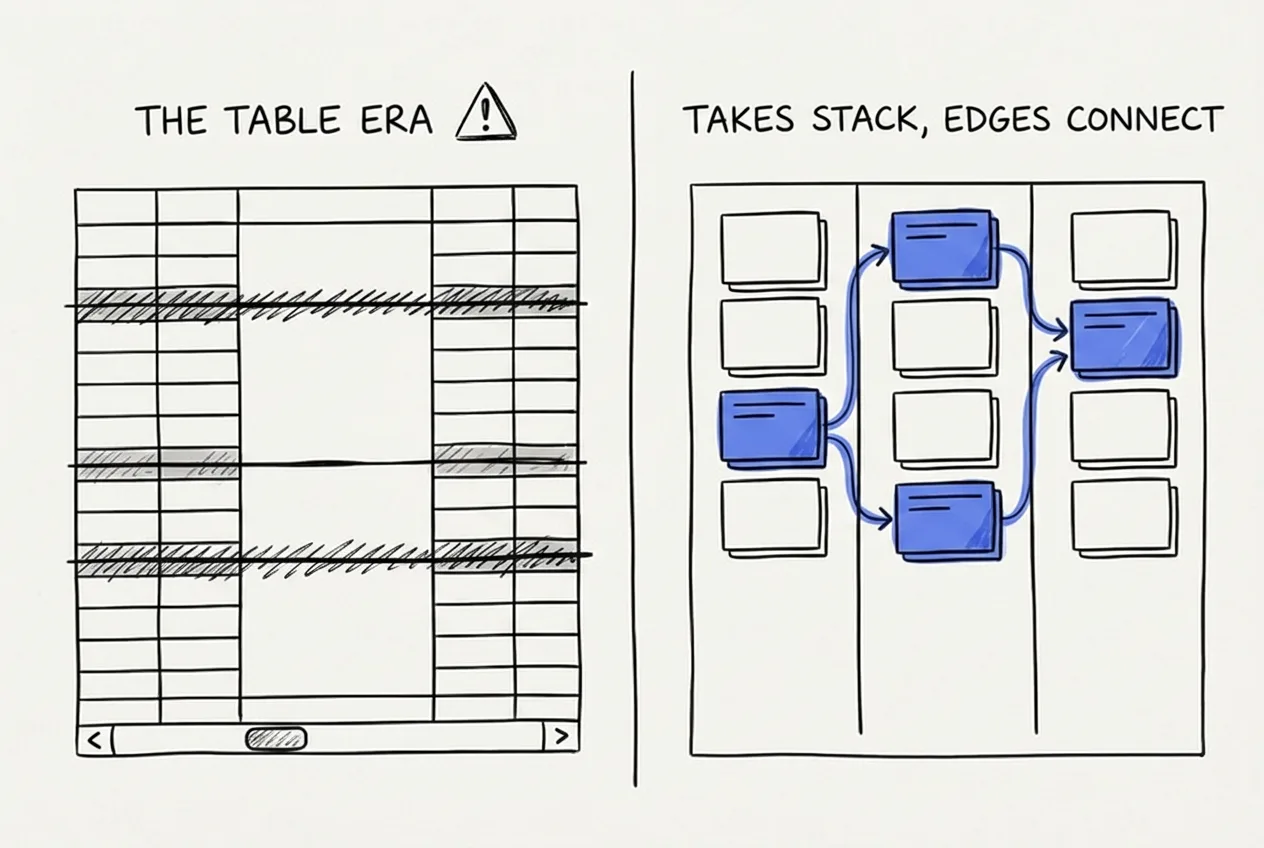
The same information in two shapes. The mess on the left isn't a discipline failure. It's a format failure.
Nothing gets destroyed in this shape. Take two sits under take one, both readable, neither pretending to be the sequence. The video's spine stays visible no matter how many alternatives you write, because alternatives grow downward while the story grows sideways.
The shape solved the bookkeeping. But it quietly surfaced the other problem, the one the table had been hiding: somebody still has to write take three.
Why AI belongs at every step (and it's not the reason you think)
Here's the thing nobody admits about the stack-of-takes workflow: writing take three of the same beat is miserable. You've already said the thing twice, and your brain keeps serving you the same sentence with the words shuffled.
That's because writer's block isn't really a starting problem. It's an iteration tax, and it gets charged every time you ask yourself for another version of something you've already written. That, honestly, is why I wired AI into every step of my own tool. Not because AI writes better scripts than you, because it doesn't. It's there because a generated take you'd never ship still breaks the blankness: you read it, you mutter "no, but," and suddenly you know what take three is. The same logic applies to mid-sentence edits, where describing the change you want, like "make this angrier and lose the statistic," is often faster than performing the change yourself.
The AI never touches the sections you're happy with. It exists to break the wall in the one you're not.
The takes it generates just stack into the column like any others. You keep the judgment, and it absorbs the tedium.
Now, maybe you're reading this thinking you don't want an app for this at all. Completely fair. The shape is the point, not the software, and the shape works on a wall.
Run it manually if you like
Here's the paper version. Get a pack of sticky notes and a stretch of wall or a whiteboard. Write each section of your video on its own note and line them up left to right in the order they'll play. That row is your video's spine, and you can see the whole thing at a glance.
When you want to try a different take of a section, don't touch the original. Write the new take on a fresh note and stick it below that section, so alternatives pile downward while the video keeps reading left to right along the top. When a lower take wins, swap it up into the top row and let the old one drop down into the stack. Whatever sits in the top row is your script.
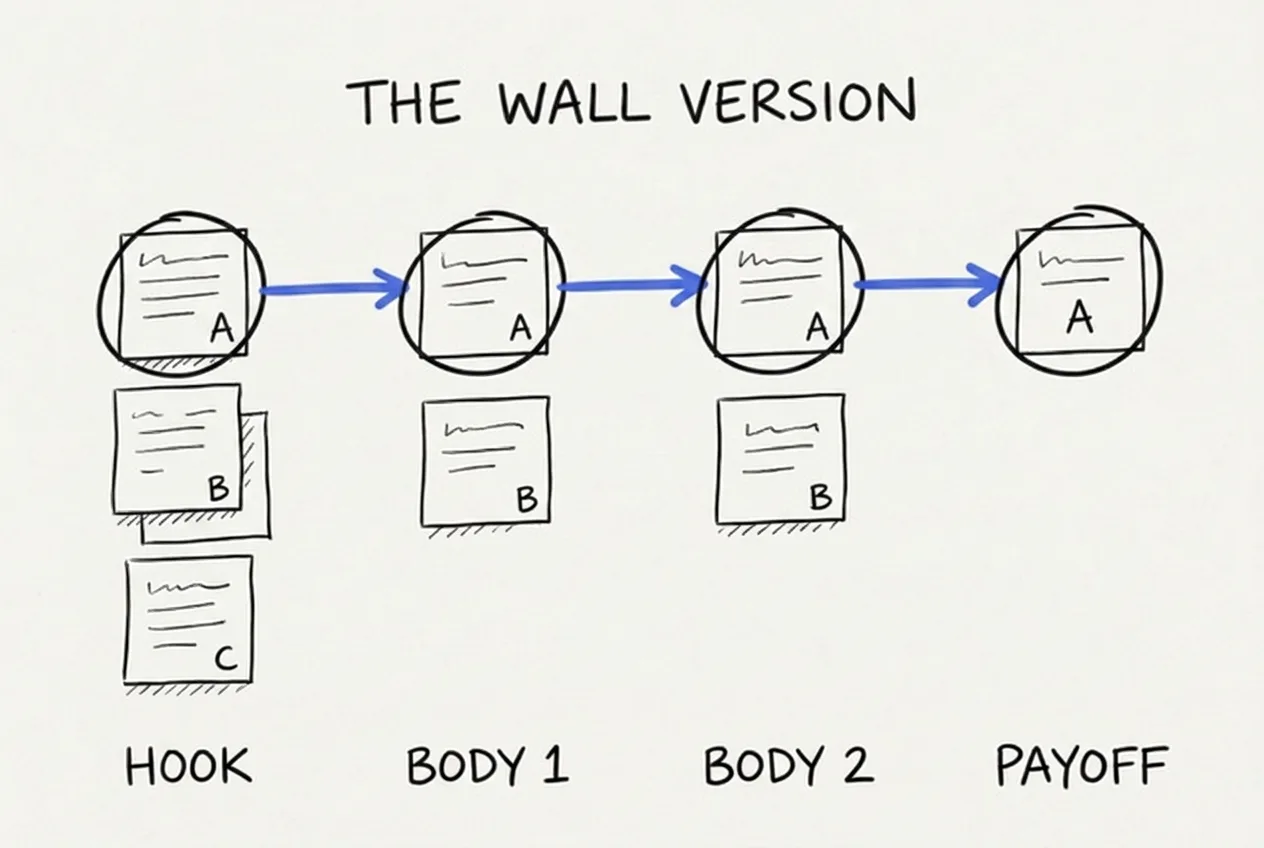
The wall version. Same shape as the board: columns are sections, stacks are takes, the connected line across the top is the script.
If that sounds familiar, look back at the board sketch above. It's the same shape: columns are sections, stacks are takes, and the top row is the path you'll record. Paper handles it fine.
What paper can't do is the upkeep. Every swap is peeling and re-sticking, every take is handwriting, nothing survives being bumped by an elbow, and when it's time to record you get to type the whole top row into a doc anyway. The shape fixes your writing, and then the maintenance of the shape becomes its own little job, video after video, forever.
That's the part I automated
That maintenance is the entire reason ScriptGraph is a node board rather than a text editor. It holds the sections as columns, stacks your takes beneath them, draws the live path for you, and drafts fresh takes with you when you're stuck on take three. It's the wall of sticky notes without the upkeep, and it has saved me hours on every script since.
Three takes of one hook. Changing the video is moving one connection.
If you want to try it, it's right here, and the free tier does full manual scripts forever, so you can test the shape of the thing before any AI touches your words.
Whether you use my tool or a wall of sticky notes, the fix is the same one this whole story kept pointing at. Your scripts don't need more discipline, and you don't need a better doc. A script is a chain of decisions, and the moment it lives somewhere that can hold your alternatives next to your sequence, the jamming, the lost takes, and the Thursday re-reads mostly just stop. Fix the container and the writing gets lighter.
Adi
P.S. The time-boxed writing method that pairs with this format is in the 90-minute script system.
50%
off · life
Founding Member offer · live now
Script your next YouTube video in 30 minutes
The first 100 subscribers lock in 50% off, for life.
Adi
Founder of ScriptGraph and part-time YouTuber since 2020.
Check out my channel