The Retention Blueprint: the 7 parts of a high-retention YouTube script
Your videos don't drag because you're boring. They drag because somewhere around minute four, one section of your video is quietly trying to do two jobs at once.
That's the real problem hiding behind most "my pacing is off" worries, and it's why faster cuts never seem to fix it. The actual fix is structure: knowing what every section of your video is supposed to do, and letting each one do exactly one thing.
In this post I'll walk you through the complete structure I script every video on. It has seven parts, each with a single job and a time budget, and I call it the Retention Blueprint. Once we've been through it, I'll prove it works by taking a video with 27 million views and mapping it onto the Blueprint timestamp by timestamp, so you can see every part doing its job in the wild.
Fair warning: after this post, it becomes hard to watch YouTube without noticing the structure everywhere.
One section, one job
Here's the rule the whole framework hangs on, and it's worth reading twice: every section of your video should have exactly one job, and the moment a section takes on a second job, viewers can feel it.
What does doubling up look like in practice? It's a hook that's also trying to introduce you and your channel. It's a story that's still wrapping up the previous point while it starts the next one. Sections like that run long, blur what they were trying to say, and create that draggy, where-is-this-going feeling you've probably noticed in your own videos. On a retention graph, it shows up as a slow and steady bleed of viewers. (If you haven't learned how to read your retention graph yet, I'd genuinely start there and come back.)
So the fix isn't writing tighter sentences or cutting faster in the edit. The fix is giving every section a cleaner job. Here are the seven jobs that matter.
The Blueprint
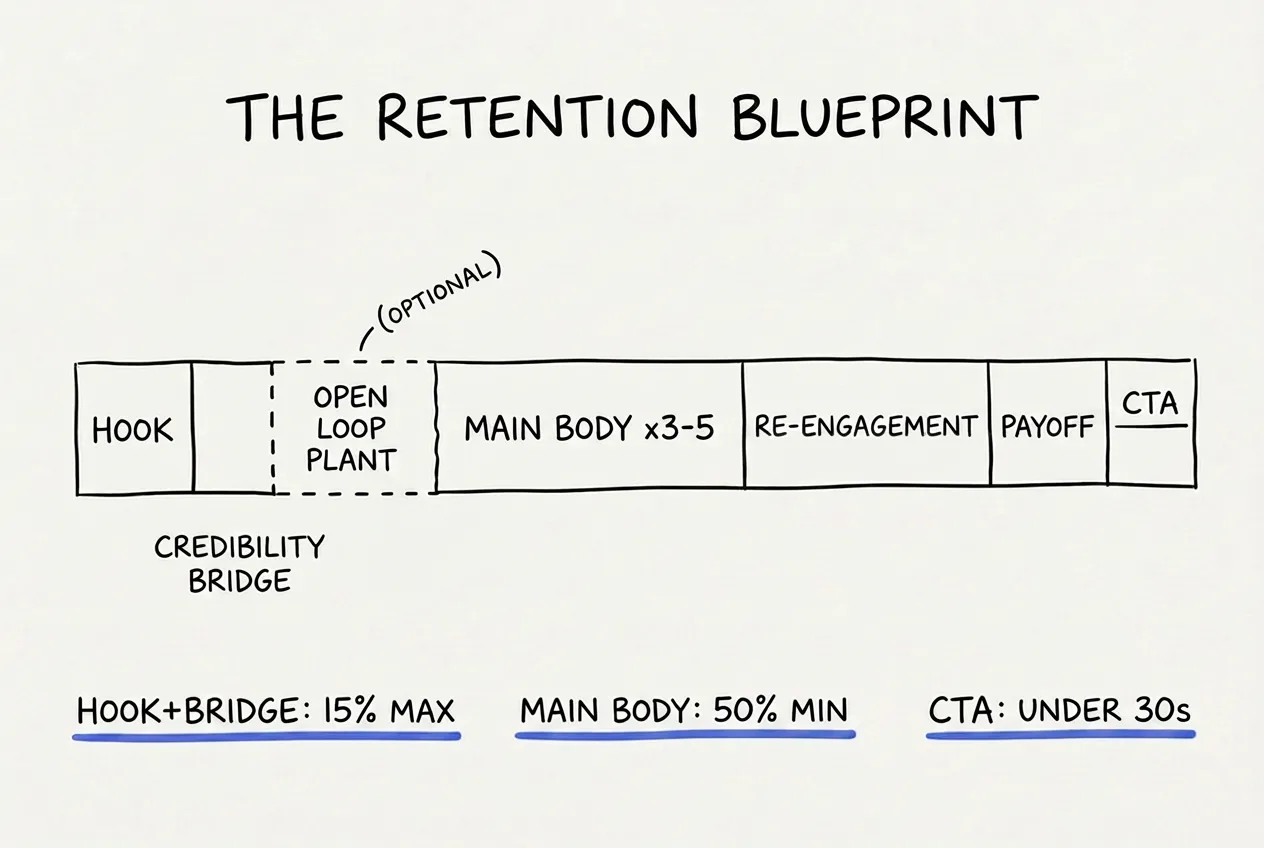
The Retention Blueprint. Seven part types, one job each, with the time budgets that keep the value up front.
Before we walk through it, one clarification that trips everyone up: these are seven part types, not seven sections. The main body repeats as many times as your content needs, and the optional part comes and goes. So a tight video might have five sections while a dense one has twelve, and both are still following the Blueprint. The roles never change; the count depends on the video.
1. The hook (30 to 60 seconds). Its one job is confirming the click. Your title made a promise, and the first two sentences need to sharpen that promise, raise the stakes, and open a question the viewer wants answered. Start mid-conversation, with no greeting and no channel intro. If you want to see this done well, I've taken apart six real hooks line by line.
2. The credibility bridge (30 to 60 seconds). Its job is giving the viewer one concrete reason to trust you on this topic. That means a result, a number, or a named experience, delivered in a sentence or two. It is not a bio, and it's not your channel's origin story. Think of it as buying the viewer's patience for everything that comes after.
3. The open loop plant (optional). Sometimes your hook's question isn't strong enough to carry a whole video on its own. This part fixes that by explicitly teasing the best thing coming later, something like "and the third method is the one that got me banned from two forums." The tease should be compelling enough to hold people, but vague enough that they still need to watch.
4. The main body (3 to 5 sections, and at least half your runtime). This is the actual content. Each body section makes one claim, explains it, and backs it up with a specific example. Two rules make these sections hold attention. First, each one runs its own small arc: it opens on something unresolved, builds the complication in the middle, and lands its point at the end rather than giving it away up front. Second, each section ends by opening the next one, because a body section that wraps up neatly is basically an exit sign for the viewer.
5. The re-engagement beat (placed at the 50 to 60% mark). Attention naturally bottoms out just past the middle of every video, so this part exists to plan for that moment instead of hoping it won't happen. You can close an earlier question and immediately open a new one, drop a reframe that changes how everything so far looks, or speak directly to the viewer. Done right, it feels like a reward for staying and a fresh reason to keep going, at the same time.
6. The payoff (second to last). Its job is keeping every promise the video made. Close every open question, deliver what the title sold, and land one memorable sentence the viewer could repeat to a friend. Don't introduce anything new here; this is where the video consolidates and sticks the landing.
7. The CTA (under 30 seconds). One ask, tied to the value the viewer just received, and then the video ends. Every extra ask you pile on weakens all the others.
Two time budgets keep the whole shape honest, and they're worth memorizing: the hook and bridge together should never take more than 15% of your runtime, and the main body should never take less than half. Put simply, the value goes up front and gets the majority of the time, and the preamble gets squeezed.
A 27-million-view video, mapped onto the Blueprint
Theory is cheap, so let's test it on a real video: Veritasium's "The Biggest Misconception About Electricity." It runs 14 minutes and 48 seconds, it has 27.7 million views, and I pulled the caption timestamps to mark every structural beat. Here's the video, if you want to fact-check me as we go:
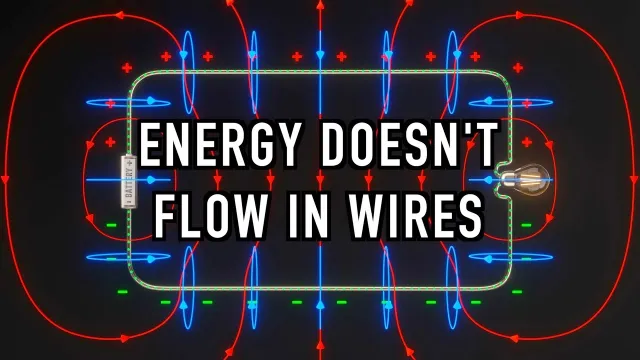
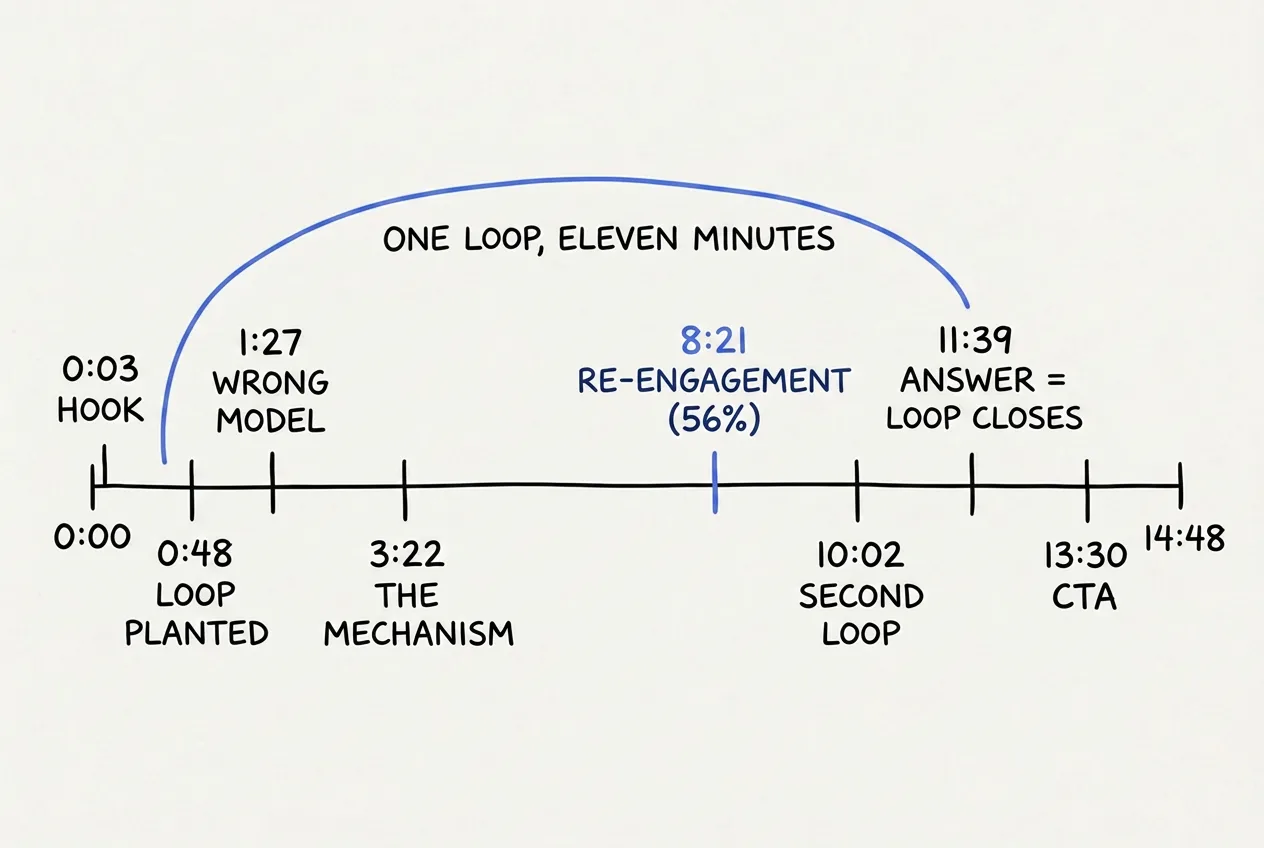
Every part of the Blueprint, present and on schedule, in one of the best-performing science videos on YouTube.
The video opens at 0:03 with the hook, a thought experiment about a circuit whose wires stretch halfway to the moon, ending in one simple question: how fast does the bulb light up? At 0:48 comes the open loop plant, and it's a masterclass. Derek asks you to commit to an answer in the comments, and explicitly tells you the answer arrives later in the video. The loop is now armed.
At 0:59 he does something interesting with the credibility bridge. Instead of citing credentials, he ties the puzzle to something you care about, which is how electricity actually reaches your home. When your channel is already the credential, relevance can do the bridge's job.
From 1:27 to about 3:17, the first body section teaches the familiar story of how electricity works, and then knocks it down with one line: "The only problem is, it's wrong." One claim, cleanly landed, and the section ends on the exact question that opens the next one. The middle bodies run from 3:22 to 9:35, covering the history, the real mechanism, and how it applies to an actual circuit, and every single one of them ends by pulling you forward into the next.
Then at 8:21 comes the re-engagement beat, in the form of expert interview cutaways. New voices, new visual texture, and outside validation, arriving at 56% of the video's runtime. Our framework says the beat belongs between 50 and 60%. Sit with that number for a second.
At 10:02 a second loop gets planted, when what sounds like an academic topic suddenly gains real stakes through a story about an undersea telegraph cable failing in 1858. And at 11:39 the payoff lands: the answer to the question from 0:48, closing a loop that stayed open for eleven minutes. That eleven-minute gap between question and answer is the retention engine of the entire video. The CTA arrives at 13:30 as a single pivot, and the video ends.
Now check the time budgets against what he actually did. The hook and bridge together take about 90 seconds of an 888-second video, which is 10%, comfortably under the 15% ceiling. The main body owns the middle ten minutes. The payoff sits in the final quarter.
A physics video with 27 million views is running the same seven-part skeleton that's available to a channel with 27 subscribers. Structure doesn't care about your budget or your subscriber count.
Which delivery style fits which section?
The Blueprint tells you what each section has to accomplish. It doesn't tell you how that section should feel to watch. That part comes down to the delivery style you choose for each section, and the same structure can carry very different styles depending on what you're making.
There are five styles worth knowing. A story builds tension toward a reveal, which makes it the best choice for body sections carrying an emotional or narrative claim. A list makes each item valuable on its own, which works when your points are parallel and don't depend on each other. An analogy anchors something unfamiliar to something the viewer already knows, and one well-placed analogy can carry your hardest section, though more than one starts to feel like a gimmick. A tutorial walks through steps in strict order, which is right whenever the promise is "you'll be able to do this yourself." And a direct argument states its claim and immediately proves it, which suits opinion videos best.
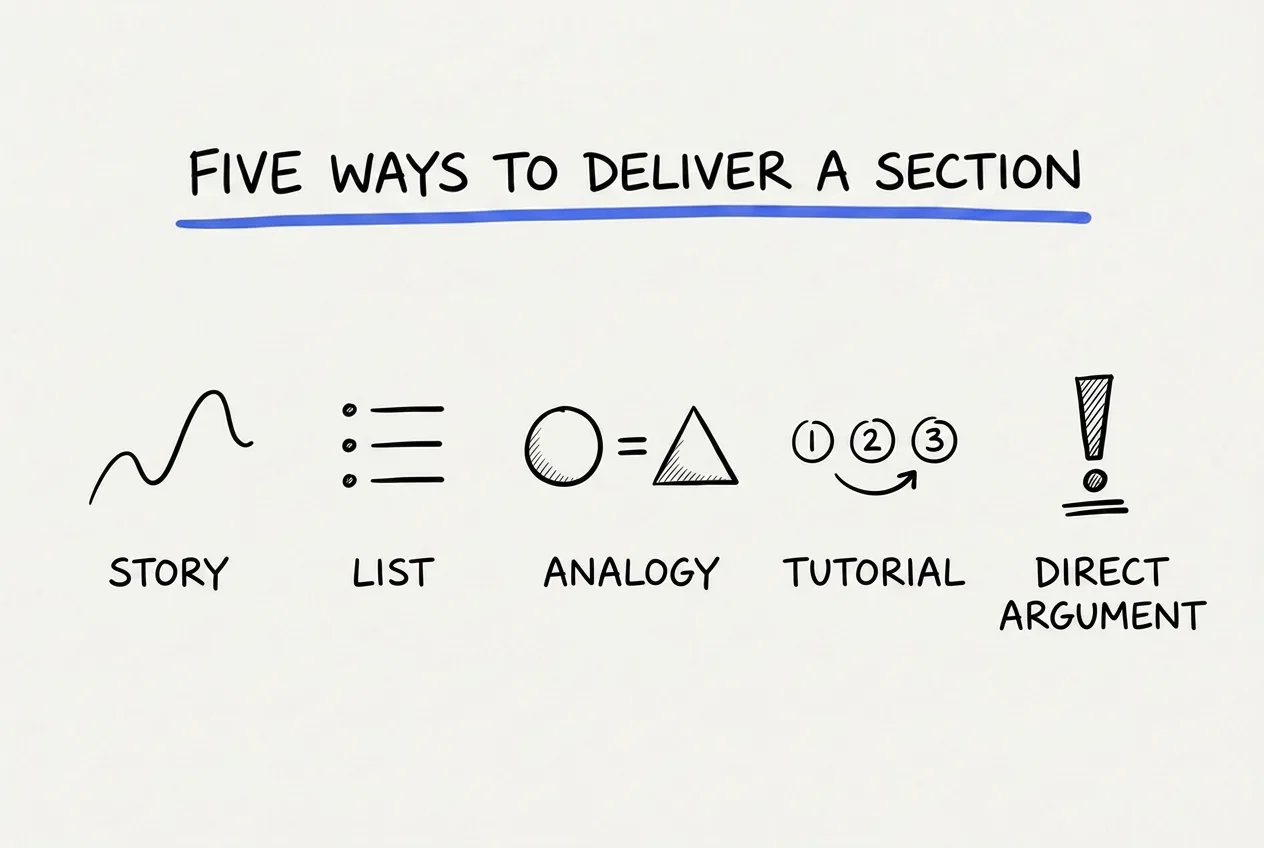
Five ways to deliver a section. Most videos mix two or three of these across their body sections.
Most good videos mix two or three of these. The Veritasium video above moves from analogy into direct argument into story, section by section, all on the same skeleton.
How to structure a YouTube video with the Blueprint
Here's how to actually use this. Take your video's target length and multiply the minutes by 140, which is roughly how many words a natural speaking pace covers per minute. That's your total word budget. Then portion it out: at most 15% to the hook and bridge, at least half to the body sections, under 30 seconds for the CTA, and the rest split between the re-engagement beat and the payoff.
Then, before writing any actual script, write one line for each section stating its single job. This step sounds almost too simple to matter, but it's the whole diagnostic: if you can't state a section's job in one line, you've just found the section that was going to drag.
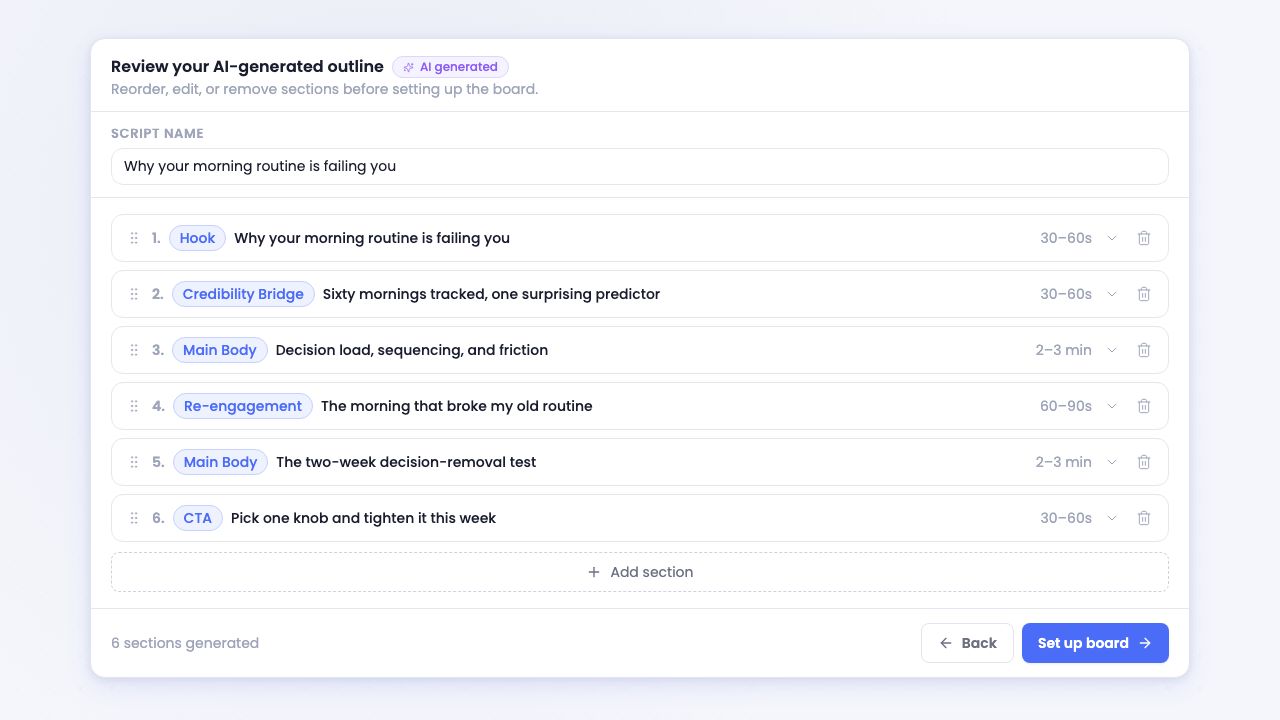
This is the Blueprint as I actually work with it in ScriptGraph, the tool I built. Each section is typed, has one job, and gets its duration budgeted before any prose exists.
If you want the full writing method that wraps around this skeleton, from the first idea through to a recorded script, that lives in the complete scripting guide.
The Blueprint, without the bookkeeping
Everything in this post is a discipline, and you now know enough to run it on paper. Seven roles, two budgets, a one-job check for every section, and loops planted where they belong.
The catch is that the discipline has to happen for every script, indefinitely. The Blueprint only compounds when video seven gets built as carefully as video one, and that's exactly when hand-run discipline starts to slip. The budgets get eyeballed, the midpoint beat gets forgotten, and a loop quietly goes unclosed.
That's why I built ScriptGraph the way I did. You describe your video, and it generates the Blueprint for you: typed sections in the right order, each with its single job and its duration budget, loops planted and closed, and the re-engagement beat sitting at the midpoint. The structure you just learned arrives pre-assembled, which frees you to spend your time on the part that's actually yours, deciding what to say inside it.
The Blueprint as a board. Each column is a part, each card is a take, and the highlighted path is your video.
Start free and watch your next outline come out already shaped like the Veritasium map above.
Quick answers
How many sections should a YouTube video have? There is no fixed number, because the seven parts of the Blueprint are roles, not a section count. The hook, credibility bridge, optional loop plant, main body, re-engagement beat, payoff, and CTA are jobs that stay constant, while the main body repeats as many times as your content needs. A tight video might come out to five sections and a dense one to twelve, and both are still following the same structure. Aim for three to five body sections as a starting point, then let the content decide the rest.
How long should a YouTube intro be? Keep the opening tight. The hook should run about 30 to 60 seconds and the credibility bridge another 30 to 60, and together the two should never take more than 15% of your total runtime. On a 12-minute video that works out to under two minutes for everything before the main content begins. The value belongs up front, so the preamble gets squeezed while the main body keeps at least half the runtime.
One section, one job. Everything else is detail.
Adi
P.S. The single strongest device inside the Blueprint is the open loop, and it deserves its own guide: open loops, explained properly.
50%
off · life
Founding Member offer · live now
Script your next YouTube video in 30 minutes
The first 100 subscribers lock in 50% off, for life.
Adi
Founder of ScriptGraph and part-time YouTuber since 2020.
Check out my channel